How To Create Nested Schemas in Python Using the Google BigQuery API
How data engineers can use Google’s BigQuery API in Python to specify nested schemas.

Nested schemas optimize data storage, but creating and updating fields with nested records can be challenging.
Schema Design in BigQuery
Nested schemas optimize data storage, but creating and updating fields with nested records can be challenging. In BigQuery, "nested and repeated" fields (using the STRUCT and ARRAY types) are the gold standard for performance. They allow you to maintain complex relationships, like a news article and its various multimedia assets, without the overhead of massive, expensive joins.
However, defining these programmatically via the BigQuery API’s SchemaField method can feel like a game of "bracket-matching" Tetris. One of the challenges I encountered when learning how to create nested schemas was the lack of resources available, in particular, resources utilizing the SchemaField method. Using the New York Times’ free API, I’ll demonstrate the "right way" to build these schemas manually, and then how to leverage AI to speed up your workflow.
Build Your Pipeline To A Data Engineering Career
You’ve reached the limit of the public preview. The full version of this post includes the implementation details: The code, the edge cases, and the "why" behind the architecture.
When you join PipelineToDE, you get:
- The DA → DE Pathway Course: A structured roadmap to bridge the gap between analysis and engineering.
- Weekly Senior Deep Dives: Fresh, tactical insights on Python, Cloud (GCP/AWS), and modern orchestration delivered every week.
- Production-Ready Blueprints: Access to 80+ protected stories and code repos from my time in the trenches as a Senior DE
- The DE Job Board (Coming Soon): Exclusive access to a curated board of high-agency Data Engineering roles.
Making the Request
For this walkthrough we’ll be querying the New York Times’ article search API to get raw JSON data that we will inform our table’s nested schema. If you’d like to follow along, you can obtain an API key. After following the procedures the New York Times describes on its developer portal, I created a GET request. In this case, I’d like to examine all articles that mention coronavirus. Without specifying any other parameters, the API will only return 10 stories.
import json as json
import pandas as pd
import requests

nyt_url = 'https://api.nytimes.com/svc/search/v2/articlesearch.json?q=coronavirus&api-key=API_KEY'
nyt = requests.get(nyt_url)
nyt_json = nyt.json()
nyt_data = nyt_json
This code provides us with a raw output containing the JSON response and accompanying payload.

However, we don’t necessarily need the response status. In order to access the body of the JSON response, we’ll need to access the ‘response’ and ‘docs’ keys, which are nested structures themselves.nyt_url = 'https://api.nytimes.com/svc/search/v2/articlesearch.json?q=coronavirus&api-key=API_KEY'
nyt = requests.get(nyt_url)
nyt_json = nyt.json()
nyt_data = nyt_json['response']['docs']

With this new output, it’s apparent that we’ll be dealing with some nested columns. In particular, examine the multimedia column.

The ‘[‘ indicates that we’re going to be dealing with a struct, which is a data type that Google BigQuery supports. Now that we can recognize the nested data types in the JSON data, it is necessary to specify a schema that can retain the JSON response.
Defining the Schema
Correctly configuring a schema will allow the load job to proceed smoothly and produce the desired output for your organization’s data consumers. Defining a schema using the BigQuery API is simple enough.schema = []
To specify the column types, BigQuery provides the SchemaField method.
from google.cloud import bigquery
from google.cloud import storage
from google.cloud.bigquery import SchemaField

schema=[bigquery.SchemaField("abstract", "STRING", mode="NULLABLE")]
There are three required components of a BigQuery schema:
- Column name
- Column type
- Column mode
In order to have a load job succeed, you must properly specify a schema using the above parameters.
Note: Although BigQuery’s documentation suggests that users can define a schema without the SchemaField() method, I’ve found that using SchemaField() to be a bit more user-friendly and helpful in preempting load errors.
With that in mind, we’ll finish defining the first level of this schema.
schema = [bigquery.SchemaField("abstract", "STRING", mode="NULLABLE"),
bigquery.SchemaField("web_url", "STRING", mode="NULLABLE"),
bigquery.SchemaField("snippet", "STRING", mode="NULLABLE"),
bigquery.SchemaField("lead_paragraph", "STRING", mode="NULLABLE"),
bigquery.SchemaField("print_section", "STRING", mode="NULLABLE"),
bigquery.SchemaField("print_page", "INTEGER", mode="NULLABLE"),
bigquery.SchemaField("source", "STRING", mode="NULLABLE")]
This corresponds with the following schema in BigQuery.

The Next Level: The Nested Schema
It’s likely that you’re accustomed to defining schemas like the prior flattened output. However, as we saw in the JSON output, the next column that the API returns contains nested records.
Syntax-wise, this is how we define a nested record.
bigquery.SchemaField("multimedia", "RECORD", mode="REPEATED",
Following the mode, we must add a new parameter: ‘fields.’
bigquery.SchemaField("multimedia", "RECORD", mode="REPEATED", fields=[]
Fields is where you’ll begin defining your nested records. For the API example, I need to define the columns contained within the ‘multimedia’ field.
bigquery.SchemaField("multimedia", "RECORD", mode="REPEATED", fields=[
bigquery.SchemaField("rank", "STRING", mode="NULLABLE"),
bigquery.SchemaField("caption", "STRING", mode="NULLABLE"),
bigquery.SchemaField("credit", "STRING", mode="NULLABLE"),
bigquery.SchemaField("type", "STRING", mode="NULLABLE"),
bigquery.SchemaField("url", "STRING", mode="NULLABLE"),
bigquery.SchemaField("height", "INTEGER", mode="NULLABLE"),
bigquery.SchemaField("width", "INTEGER", mode="NULLABLE"),
bigquery.SchemaField("legacy", "RECORD", mode="REPEATED")]
And here’s what that output looks like in BigQuery’s UI:

Note that the final field, ‘legacy’, is also a repeated record. This is starting to get complex. How would we define a nested record within a nested record?
Luckily, there’s nothing different about the approach. Just be sure to properly define the fields parameter inside of the legacy column.
bigquery.SchemaField("legacy", "RECORD", mode="REPEATED", fields=[
bigquery.SchemaField("xlarge", "STRING", mode="NULLABLE"),
bigquery.SchemaField("xlargewidth", "INTEGER", mode="NULLABLE"),
bigquery.SchemaField("xlargeheight", "INTEGER", mode="NULLABLE"),
bigquery.SchemaField("crop_name", "STRING", mode="NULLABLE")
])
Now when we check our work in the BigQuery UI we can see that we have a repeated record within a repeated record.

Combining the prior steps, here is the schema definition code.
schema = [bigquery.SchemaField("abstract", "STRING", mode="NULLABLE"),
bigquery.SchemaField("web_url", "STRING", mode="NULLABLE"),
bigquery.SchemaField("snippet", "STRING", mode="NULLABLE"),
bigquery.SchemaField("lead_paragraph", "STRING", mode="NULLABLE"),
bigquery.SchemaField("print_section", "STRING", mode="NULLABLE"),
bigquery.SchemaField("print_page", "INTEGER", mode="NULLABLE"),
bigquery.SchemaField("source", "STRING", mode="NULLABLE"),
bigquery.SchemaField("multimedia", "RECORD", mode="REPEATED", fields=[
bigquery.SchemaField("rank", "STRING", mode="NULLABLE"),
bigquery.SchemaField("caption", "STRING", mode="NULLABLE"),
bigquery.SchemaField("credit", "STRING", mode="NULLABLE"),
bigquery.SchemaField("type", "STRING", mode="NULLABLE"),
bigquery.SchemaField("url", "STRING", mode="NULLABLE"),
bigquery.SchemaField("height", "INTEGER", mode="NULLABLE"),
bigquery.SchemaField("width", "INTEGER", mode="NULLABLE"),
bigquery.SchemaField("legacy", "RECORD", mode="REPEATED", fields=[
bigquery.SchemaField("xlarge", "STRING", mode="NULLABLE"),
bigquery.SchemaField("xlargewidth", "INTEGER", mode="NULLABLE"),
bigquery.SchemaField("xlargeheight", "INTEGER", mode="NULLABLE"),
bigquery.SchemaField("crop_name", "STRING", mode="NULLABLE")
        ])
    ]),
Once you get the hang of this process, honestly, the most difficult part will be remembering to close the parentheses and brackets in the right places (luckily most IDEs match these characters for you).
Returning to our BigQuery schema, we notice that there’s one more repeated record we missed: headline.
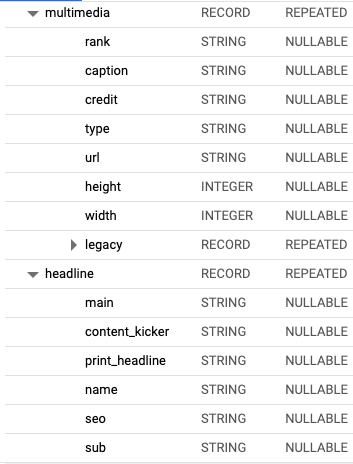
In order to properly define this field, you must ensure that you do not accidentally nest its values inside of another column like the preceding ‘legacy.’
By now you should be able to define this column, so here’s some code for you to check your work against.
bigquery.SchemaField("headline", "RECORD", mode="REPEATED", fields=[
bigquery.SchemaField("main", "STRING", mode="NULLABLE"),
bigquery.SchemaField("content_kicker", "STRING", mode="NULLABLE"),
bigquery.SchemaField("print_headline", "STRING", mode="NULLABLE"),
bigquery.SchemaField("name", "STRING", mode="NULLABLE"),
bigquery.SchemaField("seo", "STRING", mode="NULLABLE"),
bigquery.SchemaField("sub", "STRING", mode="NULLABLE")]
Assuming you’ve grasped the concepts presented up until this point, let’s put it all together.
schema = [bigquery.SchemaField("abstract", "STRING", mode="NULLABLE"),
bigquery.SchemaField("web_url", "STRING", mode="NULLABLE"),
bigquery.SchemaField("snippet", "STRING", mode="NULLABLE"),
bigquery.SchemaField("lead_paragraph", "STRING", mode="NULLABLE"),
bigquery.SchemaField("print_section", "STRING", mode="NULLABLE"),
bigquery.SchemaField("print_page", "INTEGER", mode="NULLABLE"),
bigquery.SchemaField("source", "STRING", mode="NULLABLE"),
bigquery.SchemaField("multimedia", "RECORD", mode="REPEATED", fields=[
bigquery.SchemaField("rank", "STRING", mode="NULLABLE"),
bigquery.SchemaField("caption", "STRING", mode="NULLABLE"),
bigquery.SchemaField("credit", "STRING", mode="NULLABLE"),
bigquery.SchemaField("type", "STRING", mode="NULLABLE"),
bigquery.SchemaField("url", "STRING", mode="NULLABLE"),
bigquery.SchemaField("height", "INTEGER", mode="NULLABLE"),
bigquery.SchemaField("width", "INTEGER", mode="NULLABLE"),
bigquery.SchemaField("legacy", "RECORD", mode="REPEATED", fields=[
bigquery.SchemaField("xlarge", "STRING", mode="NULLABLE"),
bigquery.SchemaField("xlargewidth", "INTEGER", mode="NULLABLE"),
bigquery.SchemaField("xlargeheight", "INTEGER", mode="NULLABLE"),
bigquery.SchemaField("crop_name", "STRING", mode="NULLABLE")
        ])
    ]),
bigquery.SchemaField("headline", "RECORD", mode="REPEATED",
          fields=[
          bigquery.SchemaField("main", "STRING", mode="NULLABLE"),
          bigquery.SchemaField("content_kicker", "STRING", mode="NULLABLE"),
          bigquery.SchemaField("print_headline", "STRING", mode="NULLABLE"),
          bigquery.SchemaField("name", "STRING", mode="NULLABLE"),
          bigquery.SchemaField("seo", "STRING", mode="NULLABLE"),
          bigquery.SchemaField("sub", "STRING", mode="NULLABLE"),
                                                ])]
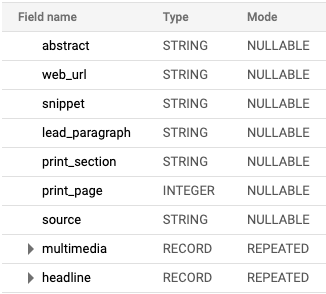
This is the final output in the BigQuery UI.
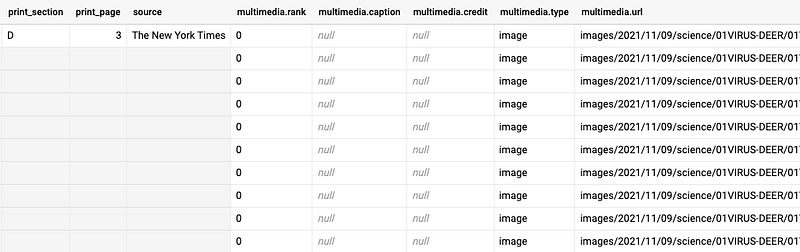
And, for clarity, a screenshot of the table this schema creates.
Why We Do It This Way First
Mastering the manual syntax is essential because it teaches you to translate JSON structures into database architecture. If you don't understand that a {} indicates a RECORD and a [ indicates a REPEATED mode, you won't be able to debug when an automated tool fails.
This manual "blueprint" ensures your data remains relational within a single row, allowing consumers to use BigQuery's UNNEST() function effectively.
The "Shortcut": Leveraging AI Agents for Schema Generation
Once you have internalized the logic behind RECORD types and REPEATED modes, you can stop writing boilerplate for every new 50-column API you encounter. AI agents like Gemini are exceptionally good at translating raw JSON snippets into BigQuery SchemaField lists—provided you give them the right professional context.
The Prompt Strategy: To get production-ready results, use a prompt that enforces the "Right Way" logic:
"I am a Data Engineer using the Google BigQuery Python SDK. Please convert the following JSON object into a list ofbigquery.SchemaFieldobjects. Ensure that nested objects are set toRECORDmode and lists of objects are set toREPEATED. UseNULLABLEfor all modes. [Paste JSON Snippet]"
By doing it the "long way" first, your role shifts from writer to auditor. You can quickly scan the AI's output to ensure it hasn't flattened a deep hierarchy or hallucinated a data type. This shortcut allows you to focus on the high-level architecture while the AI handles the bracket-matching.
Senior Tip
When dealing with deep nesting (2+ levels), keep an eye on your "Width." While BigQuery supports deep nesting, overly complex structures can become a nightmare for Data Analysts to unnest. Use the AI to generate the code, but use your experience to decide if a level of nesting should actually be flattened into its own table.