
Scrape, Clean and Store Zillow Apartment Data — Part II
Store data scraped from Zillow in a BigQuery table and view.

Now that we’ve gotten the relevant data in part I, we can work on creating our final product: A BigQuery SQL table to be used for analysis.
Recapping Part I
The steps we’ve completed so far are:
- Making a request to our base URL and applying a header to avoid triggering a captcha
- Identifying the elements that contain the data we require
- Looping through elements that contain address, price and space
- Increasing the page count to account for all returned rows
- Storing the output in a list of dicts
- Converting that list to a data frame
In this part we’re going to concentrate on deep cleaning our data.
The broad steps we’ll take are:
- Format fields in our data frame
- Create a new field, “apartment_name” derived from address
- Load to BigQuery
- Create a view that includes three new fields: num_bedrooms, num_bathrooms and sqft (square feet)
Format Data Frame And Create New Field
At first glance, the data frame we created in part 1 looks acceptable.
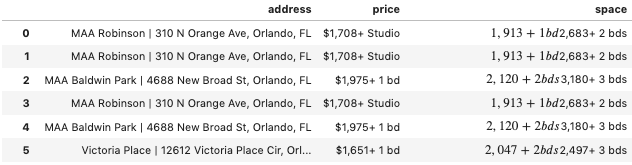
However, a closer look reveals some messiness in our data.
Build Your Pipeline To A Data Engineering Career
You’ve reached the limit of the public preview. The full version of this post includes the implementation details: The code, the edge cases, and the "why" behind the architecture.
When you join PipelineToDE, you get:
- The DA → DE Pathway Course: A structured roadmap to bridge the gap between analysis and engineering.
- Weekly Senior Deep Dives: Fresh, tactical insights on Python, Cloud (GCP/AWS), and modern orchestration delivered every week.
- Production-Ready Blueprints: Access to 80+ protected stories and code repos from my time in the trenches as a Senior DE
- The DE Job Board (Coming Soon): Exclusive access to a curated board of high-agency Data Engineering roles.